
IP authentication is adopted as the authentication mode of the third party interface
1.Set it in VOS client
Interface management—>Web access control
Directly input the IP address that needs to access the third-party interface into the allowed access IP. Take IP 172.16.5.251 as an example: 
Description:/external/server is the formal interface,/external/test/server is the test interface
The test interface can be opened through the web page, and the formal interface cannot be opened through the web page, so the interface must be called by POST
View web port
ss -anp|grep java
The HTTP port is 1752, and the HTTPS port is 2157 (the port is distinguished according to the number in the rightmost column. The smaller number is the HTTP port, and the larger number is the HTTPS port) 
2. Open http://172.16.5.251:1752/external/test/server/ enter the test interface debugging interface
Click the corresponding interface title as shown in the figure below 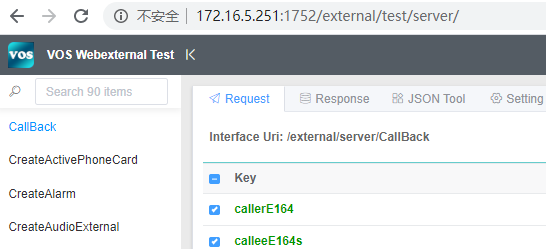
Example of formal interface debugging command:
curl -H “Content-type:text/html;charset=utf-8” -d ‘{}’ http://127.0.0.1:80/external/server/GetGatewayMappingOnline
Note:the formal interface should be debugged according to the actual address and port
Matters needing attention:
If the Vos server is on the public network and the debugger’s machine is on the intranet,then the access address of the Vos server needs to be added to the local public network address corresponding to the debugger’s intranet