
1. Calls cannot go through
Please provide the call log capture, call trace and the call flow
2. Cannot login the VOS client
Firstly please confirm the ssh whether can login, check the port 1202 listen status, the command is “ss -anput | grep 1202” 
Secondly please confirm the hd usage, the command is “df -h”, if you don’t see the “100%” words, which means the hd is normal 
If there occurs one of these two conditions, please contact Linknat technology
3. Badly voice
Voice quality is depends on the transmission network and device processing
If the voice quality is not good when the VOS does not turn on the media forwarding, then it can be considered that the VOS is normal during the troubleshooting, because the VOS does not participate in the processing of the voice flow, so there is no sound quality problem.
If the voice quality is poor when the media forwarding is turned on by VOS, you can observe whether the keyword ”lose“ in the current call ”caller received voice“ (received the voice sent to VOS by the caller) and ”called received voice“ (received the voice sent to VOS by the called party) in the current call The higher the value, the more serious the packet loss. It is necessary to verify the network, such as:
1. Is the bandwidth sufficient
2. Whether the interconnection is good or not, the problem of cross operator network may be magnified during the peak period
3. Is there a limit on the number of packets transmitted per second
No packet loss is as follows 
Packet loss is as follows 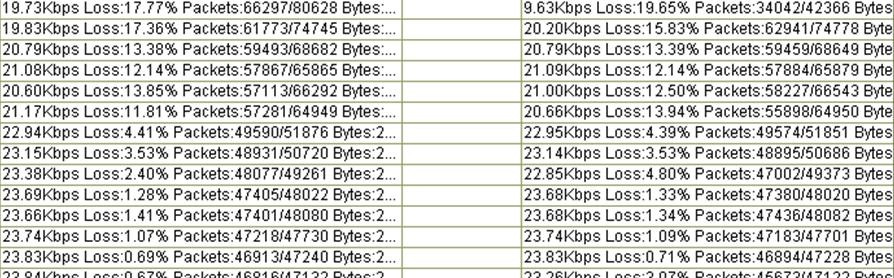
The processing capacity of the equipment is mainly reflected in the following aspects:
1. Whether the equipment of the other party is in overload operation and the media processing capacity is insufficient
2. Noise suppression and noise reduction
3. Is there a limit on the number of packets transmitted per second
In short, the more complete you can provide Kunshi technicians with the information they need to locate the problem, the faster you can handle the problem